- AI Transformation
- Services
- Works
Other projects
AI Learning PersonalizationSmart content recommendationsHotel AI ConciergeAI assistant for hotel guestsClaims Documentation AutomationPlatform for faster claims processingAI for Candidate ScreeningSmart HR efficiency boosterAI Voice AgentAI agent for hands-free learningLLM Legal SummarizationEfficient and fast legal summariesVision-Based Driving AssistanceReal-time threat detection system - Company
Yellow in Numbers
$2.1B+
Value generated through AI innovation47
Custom LLMs and AI agents deployed30M+
Engaging with products we created98%
Projects delivered within agreed budget


Key Takeaways
Defining your solution’s goals and target audience right away helps with more focused development and better user experience.
NLP/NLU, ASR, TTS, and dialogue control are the backbone of a natural-feeling AI voice copilot.
Choose between fully custom, hybrid, or no-code/low-code approaches, based on your budget, timeline, and the necessary level of control.
Focusing on data privacy, integration, and testing helps you build a reliable and scalable assistant.
Non-stop training, monitoring, and updates help your copilot stay correct and in tune with users.
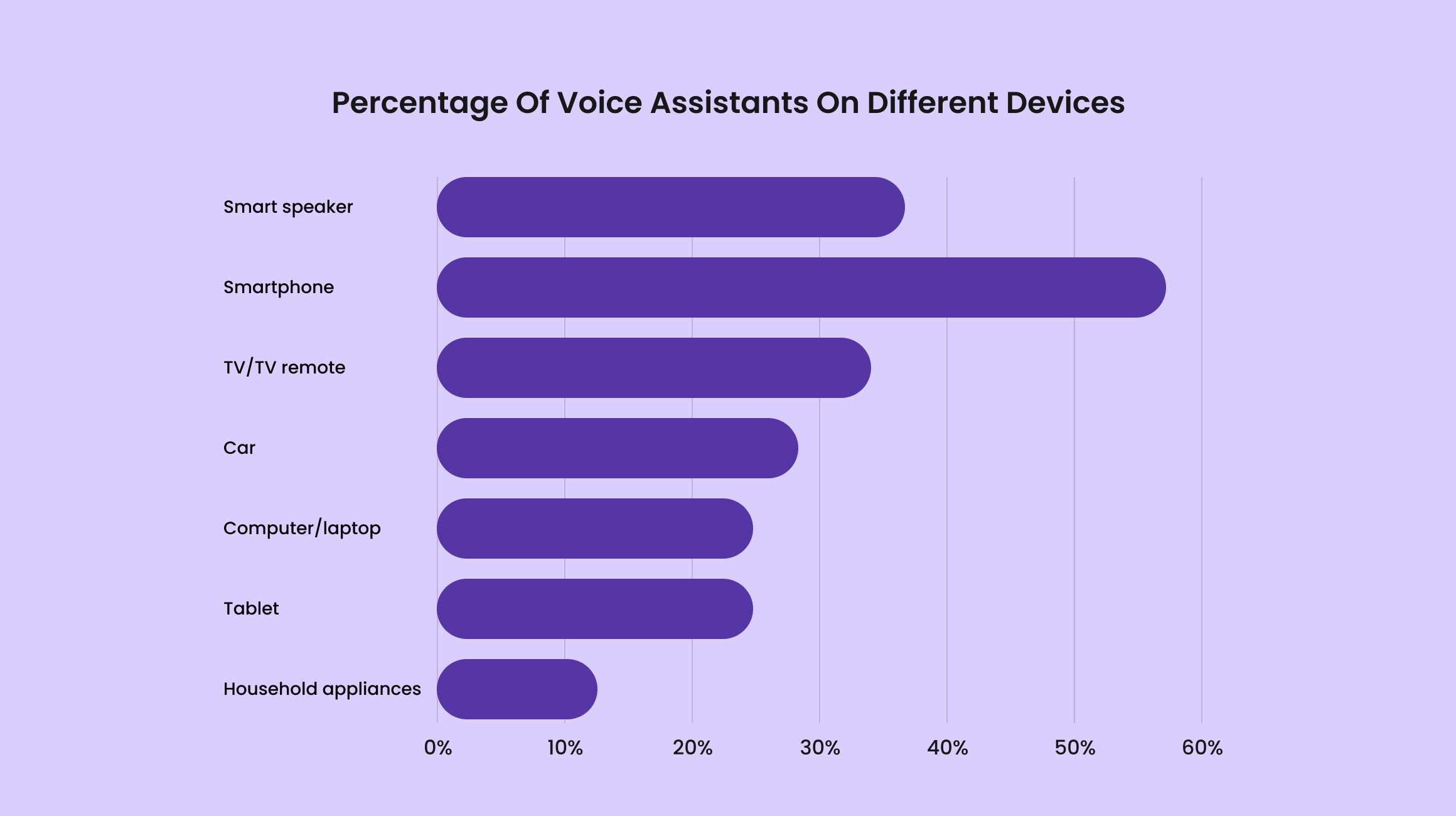
Voice assistants are not a new phenomenon in the world of technology. We're all familiar with Alexa, Siri, and Google Assistant, as these solutions have long been a familiar part of our lives. And people actively use them. For example, it’s claimed that around 37% of US residents use voice copilots to search for something on the Internet. People believe that this type of search is easier and faster than the traditional one.
Now add artificial intelligence to this mix, and you get not just a buddy with a pleasant voice, but a smart assistant that can solve any of your problems and help you with both personal and business issues. In this article, we'll explain how to make an AI voice assistant yourself, what technologies to use, and how such a solution can benefit your business.
What Is an AI Voice Assistant?
An artificial intelligence voice assistant (much like a voice-enabled chatbot) is a piece of software that understands spoken language and answers with the relevant information. These copilots use several technologies:
Speech recognition (listens to what you say)
Natural language processing (figures out what you mean)
Machine learning models (learn patterns over time)
Speech synthesis (talks back to you in a natural-sounding voice)
But modern smart voice assistants are extremely smart. They’re no longer limited to simple queries. They can hold short conversations, adjust to what you prefer, and integrate with apps and/or smart devices to automate daily tasks. Things like notifying about events, controlling lights, and answering customer questions will become a no-brainer.
We are here to help you create a smart voice assistant!
Core Technologies Powering Modern Voice Assistants
Behind every high-quality voice assistant is a top-tier tech stack that does the job. While users only hear a simple reply, a lot is happening under the hood. Here is the guide to the key technologies that make it all come together.
Natural Language Processing (NLP) & Understanding (NLU)
This part helps the assistant make sense of whatever you are saying. NLP analyses your sentence structure, identifies keywords, and handles grammar quirks. NLU goes a bit further: It figures out the intent of what you’re saying. Are you asking a question? Giving a command? Saying “thank you?” Together, these tools transform raw speech into something the algorithms can understand.
Automatic Speech Recognition (ASR)
The next step is to turn words into a machine-friendly format, and that’s where ASR comes into play. It listens to your audio input, processes sound waves, and converts them into text that the rest of the system can perceive. Modern ASR models are trained on hundreds and thousands of hours of speech so they can handle background noise, accents, and various speech tempos to provide the most accurate output.
Text-to-Speech Synthesis (TTS)
Once the copilot knows what to say, TTS gives it a voice. Today’s TTS solutions can produce speech that sounds natural and expressive, which is far from the robotic voices we used to hear a decade ago. Some TTS engines also support emotional tone, different pacing, and more emphasis, so the interactions feel more natural and reliable.
Dialogue Management & Context Tracking
This part is the “brains” of your conversational flow. Dialogue management decides how the voice agent should respond based on your request and previous cues. And context tracking helps the assistant remember what you said earlier, so it can handle follow-up questions. Without context tracking, you’d have to repeat yourself constantly, which is not something many people want.
Choosing Your Strategic Development Path
Once you learn how smart voice copilots work, the next big question is: How do you actually build one? The answer depends on your timeline, budget, tech expertise, and the customization you want.

The Custom-Built Solution for Maximum Control
If you want full ownership over every single part of your copilot, including the way the assistant sounds, learns, and connects to other services, this is the option you should choose. A fully custom-built solution means you’re designing everything from the ground up: the speech settings, the integrations, the data architecture, and the full logic behind dialogs.
What’s nice about this approach? Several things, actually:
Excellent resilience and scalability
Maximum control over literally everything
Ability to fine-tune intelligent models to your domain/audience
If your business pays additional attention to data protection and deals with niche cases, custom development is your choice. Yes, it’s more resource-consuming and expensive, but you will get a solution tailored exactly to your goals.
The Hybrid Development Approach
With a combined approach, you use existing AI tech (ASR, NLP, or TTS APIs) but wrap them inside a custom-designed system built for your product. Thanks to out-of-the-box solutions, you will develop your projects faster and at a lower cost, and still keep them customizable enough. This approach is suitable for companies that want to implement unique features without developing every component anew.
A Builder-Based MVP for Rapid Launch
If speed is your priority, an MVP built using existing voice assistant builders/platforms might be a good place to start. For example, you can use no-code/low-code tools to design voice flows, connect simple actions, and quickly prove your idea in the market. These technologies will guarantee you the fastest time to launch and minimal development costs. This is a perfect step for assessing concepts before bigger investments and realising early-stage ideas. Thanks to prebuilt solutions, you and your users will get a working assistant in the quickest way possible.
Step-by-Step Guide to Creating Your AI Voice Assistant
Piecing together an artificial intelligence voice assistant may not sound so fun, but separating the process into tiny parts makes it much more comfortable, and this tutorial will help you do that. The project’s scale doesn’t matter, the strategy will look pretty much the same.
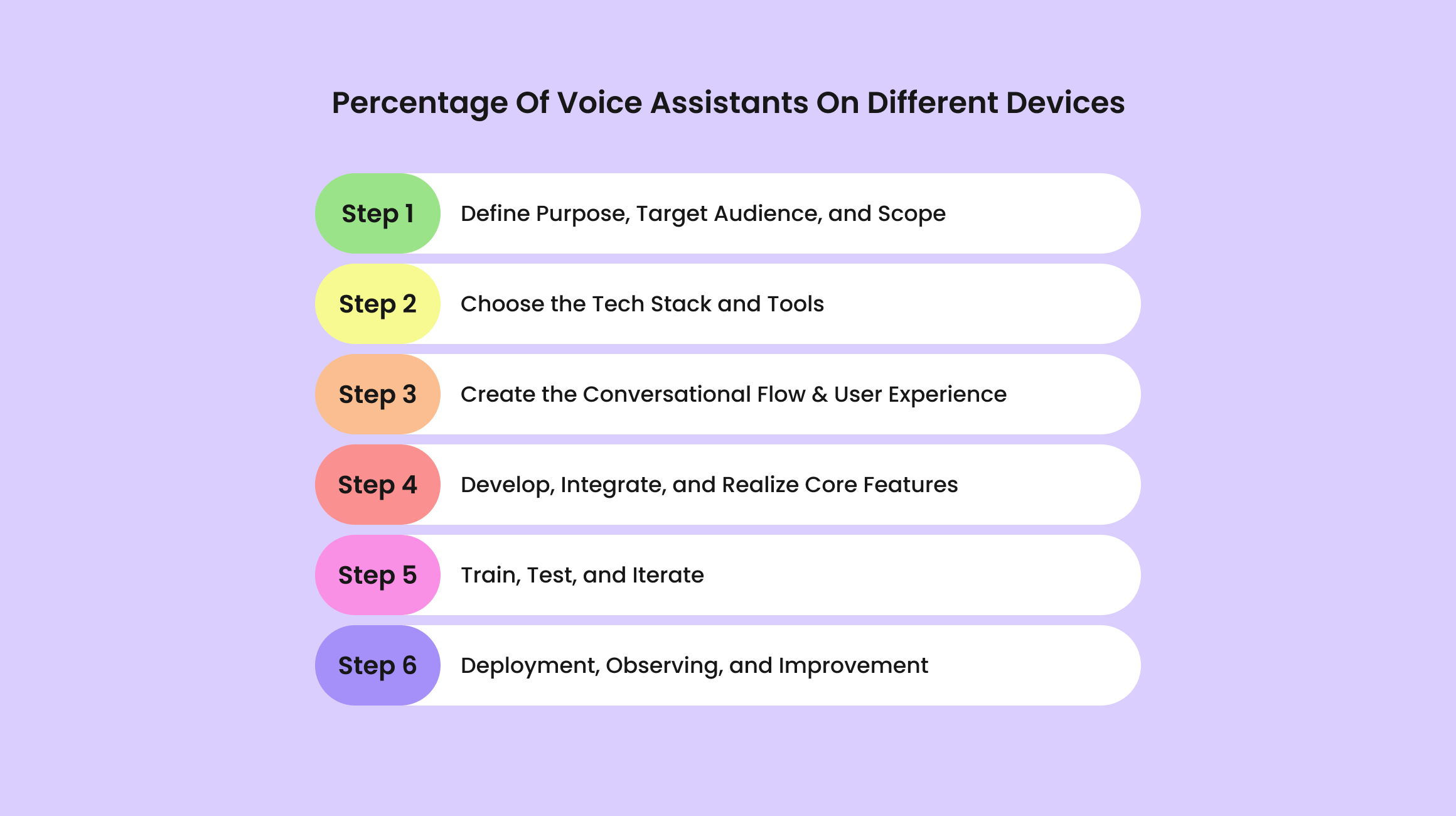
Step 1: Define Purpose, Target Audience, and Scope
The very first step is to get crystal clear on why you're building this assistant and who it’s for. Ask:
What issue is the assistant solving?
Who will use it, and in what environment?
What features are “must-have” vs. “nice-to-have”?
Without a well-defined scope, your project will likely go astray very soon. To keep it whole and ensure it actually does what it’s supposed to, you need to know exactly why you are investing in voice technologies.
Step 2: Choose the Tech Stack and Tools
You know what you're building, so now it’s time to pick the tools that will power it. Your toolkit shapes everything, including development speed and scalability. Here’s a shortlist of the most common technologies:
Programming languages: JavaScript, Python
NLP/NLU frameworks: Rasa, spaCy, Dialogflow
ASR/TTS APIs: Amazon Transcribe, OpenAI Whisper, Google Cloud Speech-to-Text
Backend and operational infrastructure: GraphQL, MongoDB, Redis, Firebase, Docker, Kubernetes
Step 3: Create the Conversational Flow & User Experience
We are going to start with “drawing a map” of all the possible ways users communicate with your voice solutions. The range of such interactions spans from simple cues to multifaceted multi-turn dialogues. Consider things like greetings/onboarding prompts, error handling, follow-up questions, tone of voice, and cases like interruptions or confusing requests. A well-designed conversational flow makes the interaction natural instead of robotic.
Step 4: Develop, Integrate, and Realize Core Features
Finally, we are about to actually build something: coding, connecting APIs, integrating smart tech, and ensuring all parts work together as they should. This is the part where all the features come to life and face the first rounds of iterations. What should a modern smart voice assistant have?
High-quality ASR for speech recognition
Strong NLP/NLU for figuring out user intent
Smooth, natural TTS for voice responses
Context tracking/memory
Datasets/tools integrations
Analytics
Multi-language support
That’s also where you’ll handle real-world details like latency and cross-device compatibility.
Step 5: Train, Test, and Iterate
These processes are a must for any software product, and your assistant is not an exception. By exposing your assistant to divergent datasets and checking it across more than 2-3 accents, environments, and conversations, you help the system comprehend real-world speech variations and user behavior.
From there, continuous testing will help you build a useful and reliable assistant. Getting user feedback, correcting misunderstandings, and minimizing awkward conversational moments build a more natural experience. The more you improve and retrain, the smarter and more enjoyable your assistant becomes.
Step 6: Deployment, Observing, and Improvement
Once the testing is done, it’s time to deploy the assistant into real-world environments. And the work doesn’t stop there, by the way. Smart voice assistants constantly interact with new users, situations, and data, so they need constant oversight to stay as effective as possible. Analysing user interactions, ASR/NLP accuracy, response speed, common errors, and satisfaction will highlight the places and issues you should pay attention to.
Key Features for Strong AI Voice Assistant Performance
If you want to produce an AI-powered voice assistant that is truly helpful, the interactions should be as intuitive and reliable as possible. And certain features will help you with that.
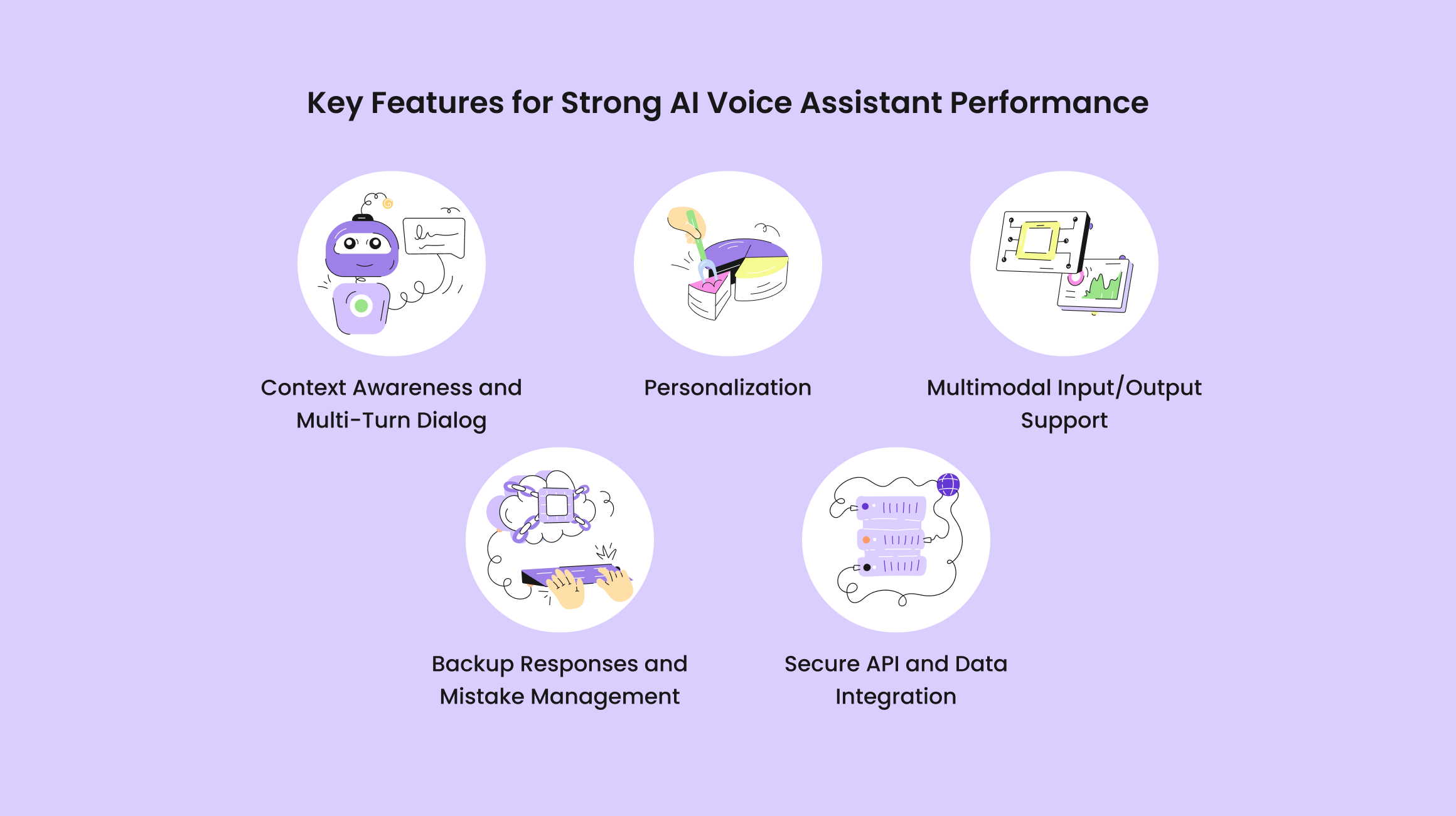
Context Awareness and Multi-Turn Dialog
A strong AI voice assistant not only reacts to simple cues but also carries on a conversation. Multi-turn dialogue means the bot can deal with follow-up questions, remember what was said earlier, and fix its responses according to context. This ability adds realism to interactions, so users can speak without repeating sentences too many times.
Personalization
Personalization takes your assistant from just practical to truly engaging. By learning what users love, do, and need, it can customize responses for each user. Personalization helps the assistant feel more like a fun companion than a generic tool.
Multimodal Input/Output Support
While voice is the primary channel, modern assistants increasingly handle multiple input/output types. They can understand text, pictures, or gestures, and respond via voice, text, or visual interfaces. Multimodal support boosts accessibility and helps users interact in the way they like.
Backup Responses and Mistake Management
Even the smartest assistant can sometimes misunderstand commands or run into an unfamiliar input. Effective AI voice bots anticipate errors and clarify things right away. Fallback methods keep the conversation flowing, so no more user frustration.
Secure API and Data Integration
Many assistants rely on external services for things like smart device control or data retrieval. Secure integration ensures these connections are safe, so sensitive information and user privacy stay secure. Proper security frontiers like authentication and access control not only save data but also allow the smart bot to communicate with third-party tools without dips in performance.
How Much Does It Cost to Develop?
The final cost of an AI voice assistant depends on your goals, your project’s complexity, and the time/money you have. While many people want to look for a one-size-fits-all number, the reality is, unfortunately, not that simple. Let’s take a look at the elements that influence development costs and build your expectations.
Aspects Influencing Development Cost
Here’s what you should pay attention to:
Project’s feature set: The more complex your assistant, the higher the cost. A basic MVP with simple queries is far less expensive than a fully handcrafted solution with multi-turn dialogue, contextual awareness, personalization, and multimodality.
Technology stack: The tools you choose affect both development speed and cost. Using an existing API/framework can cut initial costs, whereas forging everything from the ground up requires a bigger budget.
Team location/expertise: Hiring top-notch engineers in regions with higher living costs will end up pricier than working with teams in regions with not-so-high rates, though expertise is just as important (if not more). Outsourcing or mixed teams can be a good compromise.
Ongoing maintenance and cloud costs: Hosting, cloud-based AI services, bug fixes, and perpetual improvement all mean ongoing costs.
Estimated Costs and Budgeting Tips
The final costs can vary widely depending on whether you're building a simple MVP, a mid-level product, or a fully custom enterprise solution. A basic MVP (with limited commands and a simple conversational flow) typically ranges from $20,000 to $50,000. Mid-range assistants with multi-turn dialogue, contextual understanding, service connectors, and customizations usually fall between $60,000 and $150,000, depending on the number of features and supported platforms. And enterprise-grade solutions go even higher.
When planning your budget, it’s smart to prioritize must-have features for an initial release and schedule additional enhancements for later phases. Such an approach keeps early costs manageable and doesn’t take away the ability to scale the feature set based on what users and reporting tools say. You should also take into account continuing expenses like cloud hosting, third-party API dependencies, and regular retraining.
Best Development Practices
Building a truly reliable voice assistant requires sticking to the best practices that will save your time, get rid of headaches, and make your solution reliable and trustworthy.
Prioritize Data Security from Day One
Security and data privacy aren’t optional. From the first line of code, you should implement actions to protect user data, whether it’s personal preferences, dialog history, or connected accounts. This includes protecting data during its journey in your system, using top-tier authentication protocols, and obeying the relevant regulations.
Concentrate on Integration and Scalability
A voice copilot that works well today may see more users, features, and/or devices tomorrow. Keeping scalability in mind from the beginning means your system can grow without breaking. Similarly, a good integration with existing apps, databases, and third-party services is a must. Well-designed architecture allows new capabilities to be added smoothly and makes it easier to face the changes.
Implement QA and Testing
Even small misunderstandings can make a voice assistant feel frustrating. Using different devices, accents, noise conditions, and scenarios for testing shows whether the assistant’s performance is steady in real-world situations. Automated testing, user simulations, and beta programs all help see issues early.
Why Yellow for AI Voice Assistant Development?
If you want to release a high-quality and natural-sounding voice assistant, Yellow is here to help you! We are an artificial intelligence development agency that has extensive experience in building smart conversational assistants that will upgrade your business processes.
Why choose us for this task?
Open communication all the way: We stay in touch, hear what’s on your mind, and make sure you know exactly what’s happening with your project at every step.
Data protection: We use proven strategies to make sure your data stays safe with us.
Business-first approach: Your business needs are what drive the development. Every feature we create fits perfectly into your requirements and makes your business shine brighter among the competitors.
Build your perfect voice solution with Yellow!
Bottom line
Learning how to build an AI voice assistant may sound scary, but taking it step by step and listening to best practices creates a much more achievable goal. Starting with core technologies and ending with engaging conversations, every part directly affects the final results. And if you approach it correctly, your AI voice assistant can become a precious tool that feels helpful and truly smart.
Got a project in mind?
Fill in this form or send us an e-mail
Can I develop an AI voice assistant without knowing how to code?
What is the difference between using open-source models (like Whisper) vs. commercial APIs for speech recognition?
How can I measure the success/ROI of a custom AI voice assistant after deployment?
Subscribe to new posts.
Get weekly updates on the newest design stories, case studies and tips right in your mailbox.